June 4, 2026 · Matteo
How to Optimize SEO on Shopify (4-Week Plan)
How to optimize SEO on Shopify works best as a repeating cycle, not a one-afternoon task. This post is a 4-week action plan only.
For the full reference (checklists, image SEO depth, on-page basics), read the hub: how to optimize a Shopify store for SEO.
Before you start
Pick one primary metric: organic sessions, Image Search clicks, or revenue from organic. Run a baseline in Google Search Console if you have not already.
Week 1: Get indexed and measure
Goal: Google can crawl your store and you have a speed baseline.
- Verify your domain in Search Console and submit
sitemap.xml. - URL-inspect your homepage and top product. Request indexing if needed.
- Run PageSpeed Insights (mobile) on homepage, best collection, best seller.
Step-by-step indexing: how to add your Shopify store to Google.
Done when: Search Console shows pages indexed and you saved PageSpeed scores.
Week 2: Fix your top 20 products
Goal: Highest-revenue URLs have clean on-page SEO.
For your top 20 products by sales:
- Unique title and meta description (Search engine listing).
- Alt text on every gallery image in Products → Media.
- Descriptive filenames on re-upload (not
IMG_xxxx.jpg). - Readable URL handle (
/products/blue-linen-shirt).
Do not boil the ocean. Twenty strong product pages beat two hundred thin ones.
Image size targets if you re-upload: Shopify image size guidelines.
Done when: All top 20 products pass a manual spot check in admin.
Week 3: Scale catalog image SEO
Goal: Fix alt text and file format beyond your top sellers.
Manual edits fade after ~50 SKUs. Options:
- DIY: Block time, same steps as Week 2, batch by collection.
- Pixly: Store Audit (Growth/Scale) → queue flagged products → Review → sync. Tutorial: how to use Pixly.
After a scan, flagged products appear in the Store Audit list on the Auto-Pilot page:
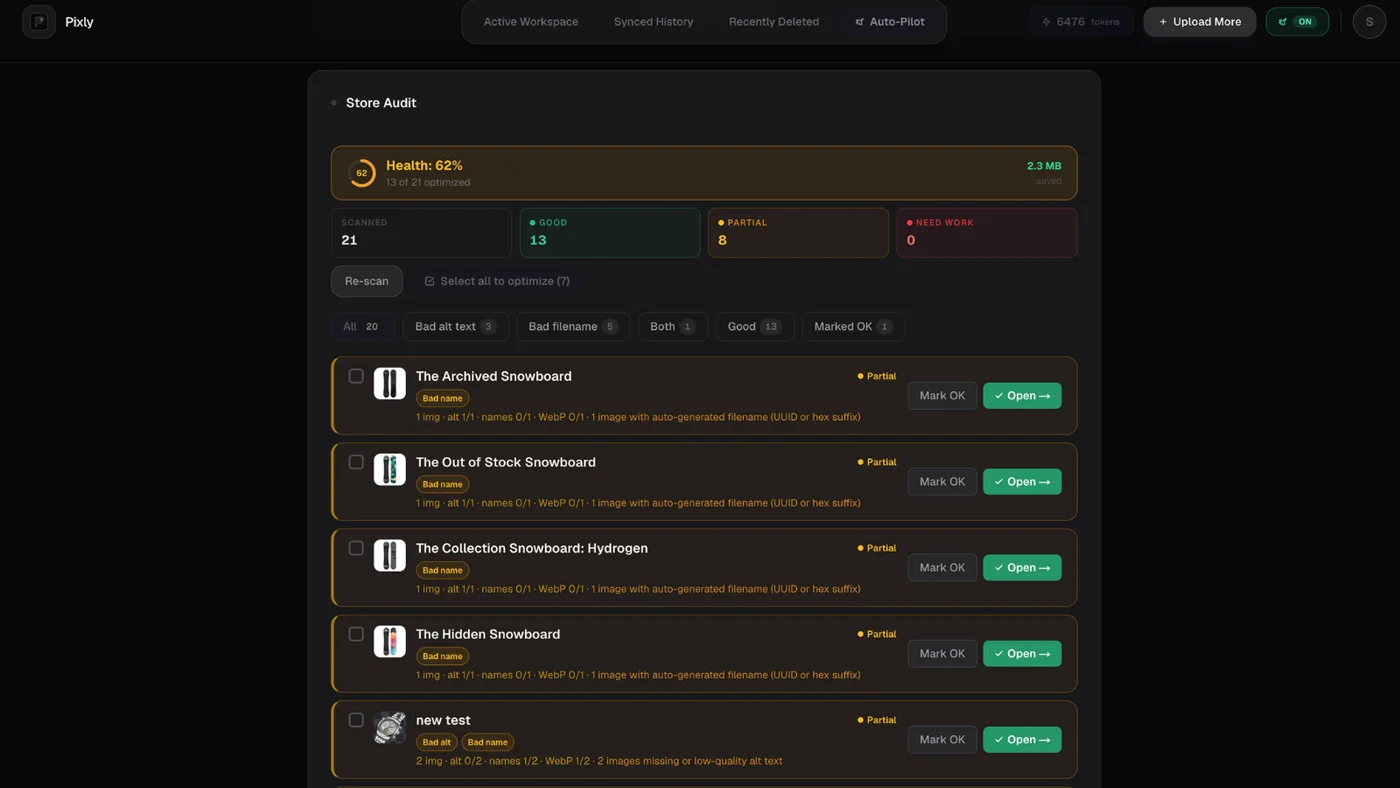
Pilot 10 products, preview the storefront, then expand.
Done when: Store Audit (or your spreadsheet) shows no missing alt text on best sellers and hero collections.
Week 4: Speed, apps, and one content piece
Goal: Remove non-content bottlenecks and publish one helpful page.
- Remove unused Shopify apps (script weight).
- Compress homepage banner assets in the theme editor.
- Publish one blog post or FAQ that answers a real buyer question. Link to a collection.
- Re-run PageSpeed on the same URLs from Week 1.
Speed playbook: how to optimize Shopify store speed.
Done when: Mobile PageSpeed on your best seller is flat or improved and one new content URL is live.
Repeat monthly
- Check Search Console Performance for page-2 queries worth optimizing.
- Add alt text to new products before launch.
- Refresh seasonal collection meta descriptions.
- Revisit tools once a year: best Shopify image optimization tools 2026.
Got questions?
Frequently asked
Bottom line
How to optimize SEO on Shopify: four weeks, four focuses (index, top products, catalog images, speed + content). Use the store SEO hub when you need the full picture.
Install Pixly on Shopify · Features · Blog
Written by Matteo, founder of Pixly. Questions? hello@getpixly.app
Pixly for Shopify
Your product image studio for Shopify
Square WebP, alt text, and clean filenames on every product photo. Review before sync. Start free with 69 tokens every month.
More from Pixly
- How Pixly works — upload, AI analysis, review, Shopify sync
- Features — Store Audit, Auto-Pilot, WebP, alt text
- Pricing — start free with 69 tokens per month
- How to Optimize Shopify Store for SEO (2026 Guide)
- How to Add Your Shopify Store to Google (2026 Guide)
- How to Use Pixly on Shopify (2026 Guide)