26 maggio 2026 · 2 min di lettura
Come rimuovere lo sfondo dalle foto prodotto su Shopify (Guida 2026)
Come scontornare le foto prodotto su Shopify: sfondo bianco o PNG trasparente, strumenti manuali, flusso in blocco e rimozione dello sfondo con Pixly, con revisione finale.
White-background product grids look clean on marketplaces and ads. Remove background from Shopify product images when suppliers send messy shots or you need transparent PNGs for Facebook and Google catalogs.
This guide covers when to cut backgrounds, manual tools, and bulk removal with review before sync.
When background removal helps
| Use case | Typical output |
|---|---|
| Marketplace-style grid | Pure white #FFFFFF background |
| Ads and lookbooks | Transparent PNG |
| Consistent collection page | Uniform white behind mixed suppliers |
Background removal does not replace good lighting. It standardizes presentation.
Manual background removal
- Open image in Photoshop, Photopea, or remove.bg.
- Cut subject, refine edges (hair, lace needs extra care).
- Export PNG (transparent) or JPEG on white.
- Products → Media → upload → alt text → Save.
Time: 5–15 minutes per image for careful edge work. Not scalable alone.
Shopify and transparent PNGs
Shopify accepts PNG with transparency on product media. File size can grow vs WebP photos. For catalog photos, many merchants prefer white background JPEG/WebP unless transparency is required for ads.
Pixly defaults to WebP and 1:1 square crop for product sync. Background removal is an optional step when you need cutouts.
Bulk background removal with Pixly
Background removal costs +3 tokens per image and requires a Growth or Scale plan. Enable during review, inspect edges, then approve.
Review shows the processed square output before sync:
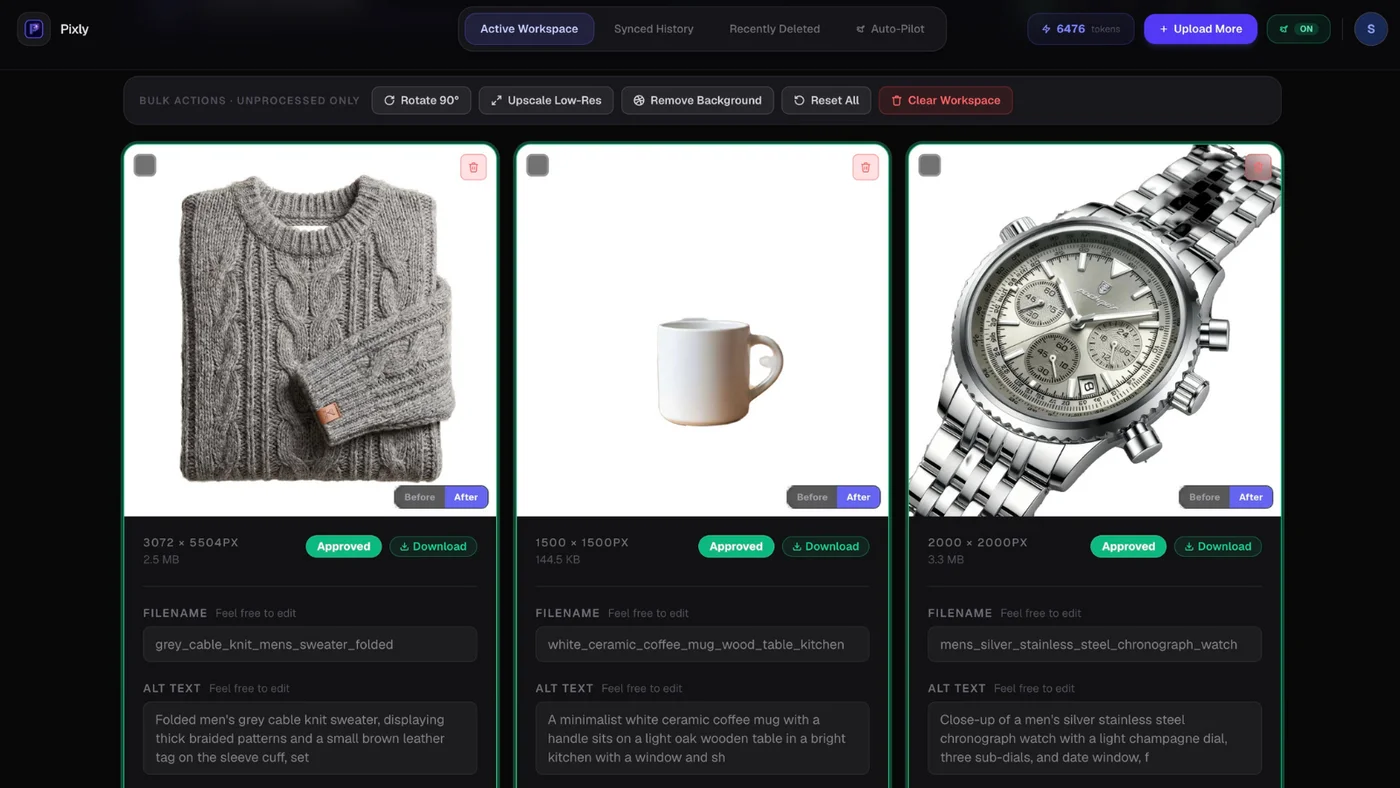
Pair with AI alt text so cutout products still rank in image search. See alt text SEO.
Quality checklist after removal
- Edges clean on hair, fur, glass
- No gray fringing on white backgrounds
- Shadow intentional or removed consistently
- Alt text describes product, not "on white background" alone
- File size reasonable after export
Got questions?
Frequently asked
Not natively. Use design tools or an app workflow, then upload or sync the result.
White JPEG/WebP for standard product pages. Transparent PNG when ads or channels require it.
Optional per image during review (+3 tokens, Growth/Scale). You approve before sync.
No if alt text and filenames stay descriptive. File size matters for speed; WebP helps after cutout.
Yes with batch import and review in Pixly. Pilot 10 SKUs for edge quality first.
Bottom line
Remove background from Shopify product images for consistent grids and ad-ready assets. Manual tools work for small sets; bulk catalog work needs review-first batch removal.
Install Pixly on Shopify on Growth or Scale to test background removal on real products.
Pronto a dare un tocco professionale alle tue foto prodotto?
Fai il quiz di 1 minuto per scoprire il piano consigliato, oppure inizia subito gratis. Inizia gratis con 69 token. Nessuna carta richiesta.
Nessuna carta di credito richiesta · Disdici quando vuoi
Scopri di più su Pixly
- Come funziona Pixly — carichi, l'AI analizza, controlli, sincronizzi con Shopify
- Funzionalità — Store Audit, Auto-Pilot, WebP, testo alternativo
- Prezzi — parti gratis con 69 token al mese
- I migliori tool per ottimizzare le immagini su Shopify (Guida 2026)
- Dimensioni delle immagini Shopify: linee guida (Guida 2026)
- Come usare Pixly su Shopify (Guida 2026)