26 de mayo de 2026 · 3 min de lectura
IA para imágenes de producto en Shopify (Guía 2026)
IA para imágenes de producto en Shopify: generación de texto alternativo, análisis visual, ampliación, eliminación de fondo y revisión antes de sincronizar en flujos de catálogo.
Shopify product image AI covers tools that read photos, not just filenames. Merchants use AI for alt text, background removal, upscale, and catalog audits when manual edits do not scale.
This guide maps what AI can do on product media, what still needs human review, and how Pixly fits a Shopify workflow.
What AI can do on Shopify product images
| Task | AI role | Merchant role |
|---|---|---|
| Alt text | Describe color, material, angle from pixels | Approve accuracy |
| SEO filenames | Propose slugs from visual + product context | Edit outliers |
| Upscale | Add pixels to soft phone shots | Reject fake-looking output |
| Background removal | Cut subject to white or transparent | Check edges |
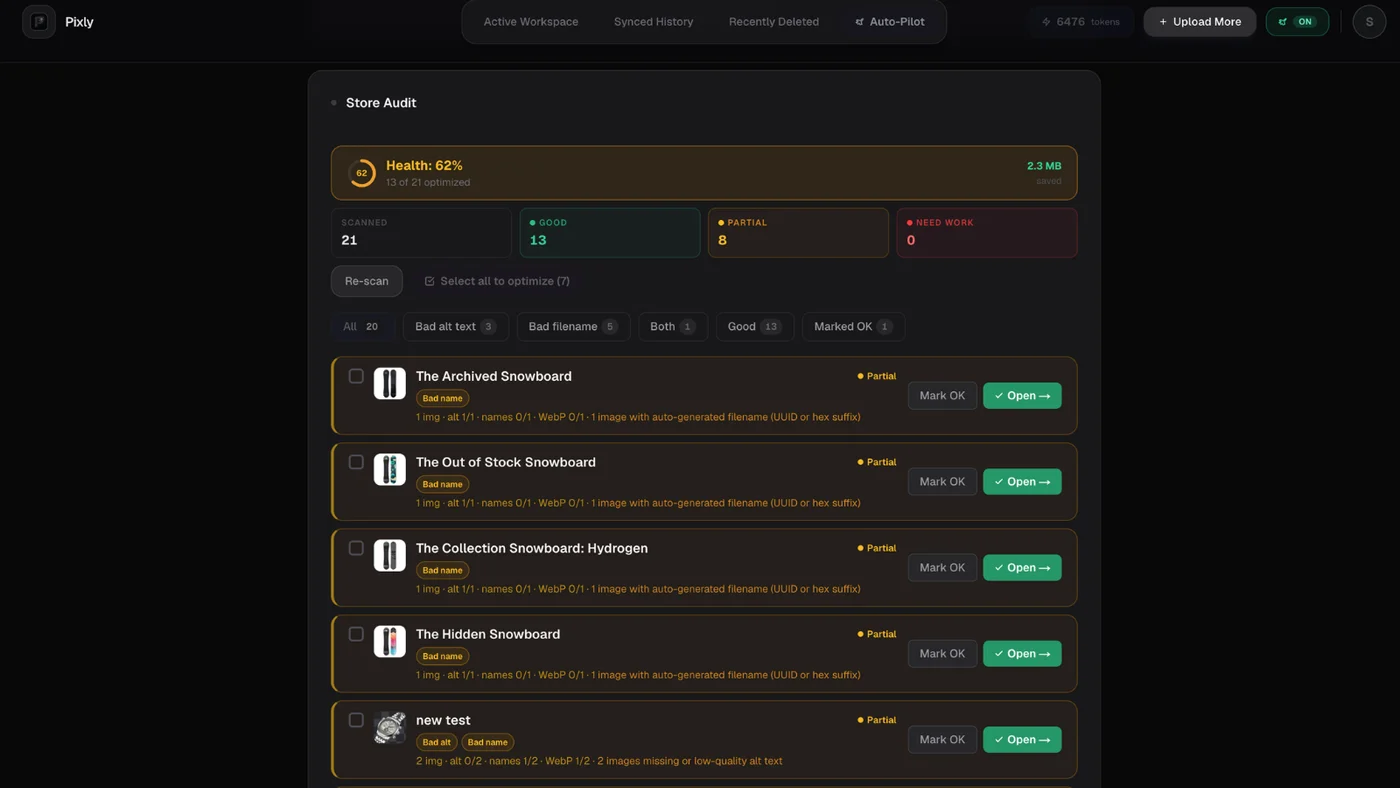
| Catalog audit | Flag missing alt, WebP, low-res | Prioritize fixes |
AI shopping agents and Google read text about images. Visual AI fills that gap faster than templates.
What AI should not do unsupervised
- Auto-publish without review on a live catalog
- Guess variant color when the photo is ambiguous
- Replace brand-critical photography style decisions
- Upscale motion-blurred or wrong-product shots
Pixly defaults to review before sync. Full Auto exists on higher plans for merchants who opt in.
Pixly AI pipeline (product media)
- Ingest images from upload or Shopify import
- Analyze with Pixly's AI for alt text and metadata
- Process WebP, 1:1 crop, optional upscale or background removal
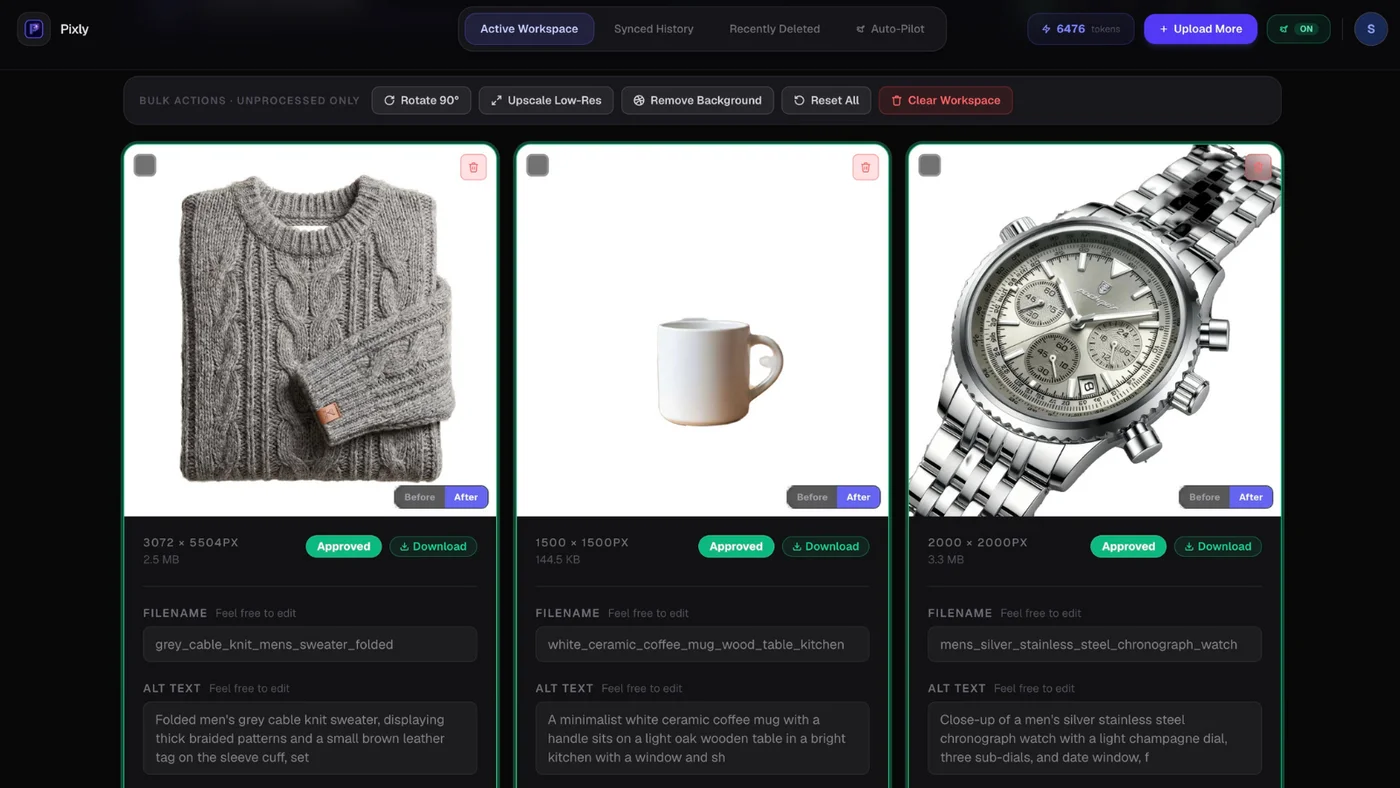
- Review every card in the Decision Hub
- Sync approved files to Shopify Admin API
Review screen shows AI output before anything goes live:
On Starter and above, Store Audit uses catalog rules to flag image SEO gaps:
AI product images vs AI search visibility
Generating new photos with Midjourney is a different topic than optimizing existing catalog photos for search. For ChatGPT Shopping and AI Overviews, focus on alt text and filenames on real product shots. See AI search and ChatGPT shopping.
Compare AI image tools for Shopify
| Capability | Pixly | Generic alt tools | Design AI |
|---|---|---|---|
| Reads your Shopify catalog | Yes | Varies | No |
| WebP + square crop + sync | Yes | Rare | No |
| Review before sync | Yes | Varies | N/A |
| Background removal | Yes (+tokens) | Some | Yes |
| Shopify Admin API sync | Yes | Varies | No |
Full comparison: best Shopify image optimization tools.
Got questions?
Frequently asked
Shopify adds platform AI features over time, but catalog-wide alt text, WebP conversion, and sync workflows typically come from specialized apps like Pixly.
Strong starting point when the model sees the photo. Always verify color, variant, and angle before sync.
Yes. Pixly optional upscale targets 2048 px with approval. See upscale guide.
Pixly uses tokens per image; background removal (+3 tokens, Growth/Scale) and upscale (+4 tokens) add cost. Pricing lists plans; the free tier includes 69 tokens/month for core processing.
Not on default Semi-Auto and manual review flows. You approve before sync.
Bottom line
Shopify product image AI is most useful when it reads your real photos and writes metadata plus optimized files you approve. Templates and blind auto-sync do not scale trust.
Install Pixly on Shopify and test AI alt text on live products.
¿Listo para mejorar tus fotos de producto?
Haz el test de 1 minuto y te recomendamos un plan, o empieza gratis. Empieza gratis con 69 tokens. Sin tarjeta.
Sin tarjeta de crédito · Cancela cuando quieras
Más de Pixly
- Cómo funciona Pixly — sube, analiza con IA, revisa y sincroniza con Shopify
- Funciones — Store Audit, Auto-Pilot, WebP, texto alternativo
- Precios — empieza gratis con 69 tokens al mes
- Imágenes de producto de Shopify para búsqueda con IA y ChatGPT Shopping (Guía 2026)
- SEO del texto alternativo en Shopify (Guía 2026)
- Cómo usar Pixly en Shopify (guía 2026)