4. Juni 2026 · 3 Min. Lesezeit
SEO für Shopify optimieren: der 4-Wochen-Fahrplan
Ein 4-Wochen-Fahrplan für Shopify-SEO: Indexierung, Produktseiten, Katalogbilder, dann Ladezeit und Content. Mit Link zur kompletten SEO-Checkliste für deinen Shop.
How to optimize SEO on Shopify works best as a repeating cycle, not a one-afternoon task. This post is a 4-week action plan only.
For the full reference (checklists, image SEO depth, on-page basics), read the hub: how to optimize a Shopify store for SEO.
Before you start
Pick one primary metric: organic sessions, Image Search clicks, or revenue from organic. Run a baseline in Google Search Console if you have not already.
Week 1: Get indexed and measure
Goal: Google can crawl your store and you have a speed baseline.
- Verify your domain in Search Console and submit
sitemap.xml. - URL-inspect your homepage and top product. Request indexing if needed.
- Run PageSpeed Insights (mobile) on homepage, best collection, best seller.
Step-by-step indexing: how to add your Shopify store to Google.
Done when: Search Console shows pages indexed and you saved PageSpeed scores.
Week 2: Fix your top 20 products
Goal: Highest-revenue URLs have clean on-page SEO.
For your top 20 products by sales:
- Unique title and meta description (Search engine listing).
- Alt text on every gallery image in Products → Media.
- Descriptive filenames on re-upload (not
IMG_xxxx.jpg). - Readable URL handle (
/products/blue-linen-shirt).
Do not boil the ocean. Twenty strong product pages beat two hundred thin ones.
Image size targets if you re-upload: Shopify image size guidelines.
Done when: All top 20 products pass a manual spot check in admin.
Week 3: Scale catalog image SEO
Goal: Fix alt text and file format beyond your top sellers.
Manual edits fade after ~50 SKUs. Options:
- DIY: Block time, same steps as Week 2, batch by collection.
- Pixly: Store Audit (Starter and above) → queue flagged products → Review → sync. Tutorial: how to use Pixly.
After a scan, flagged products appear in the Store Audit list on the Auto-Pilot page:
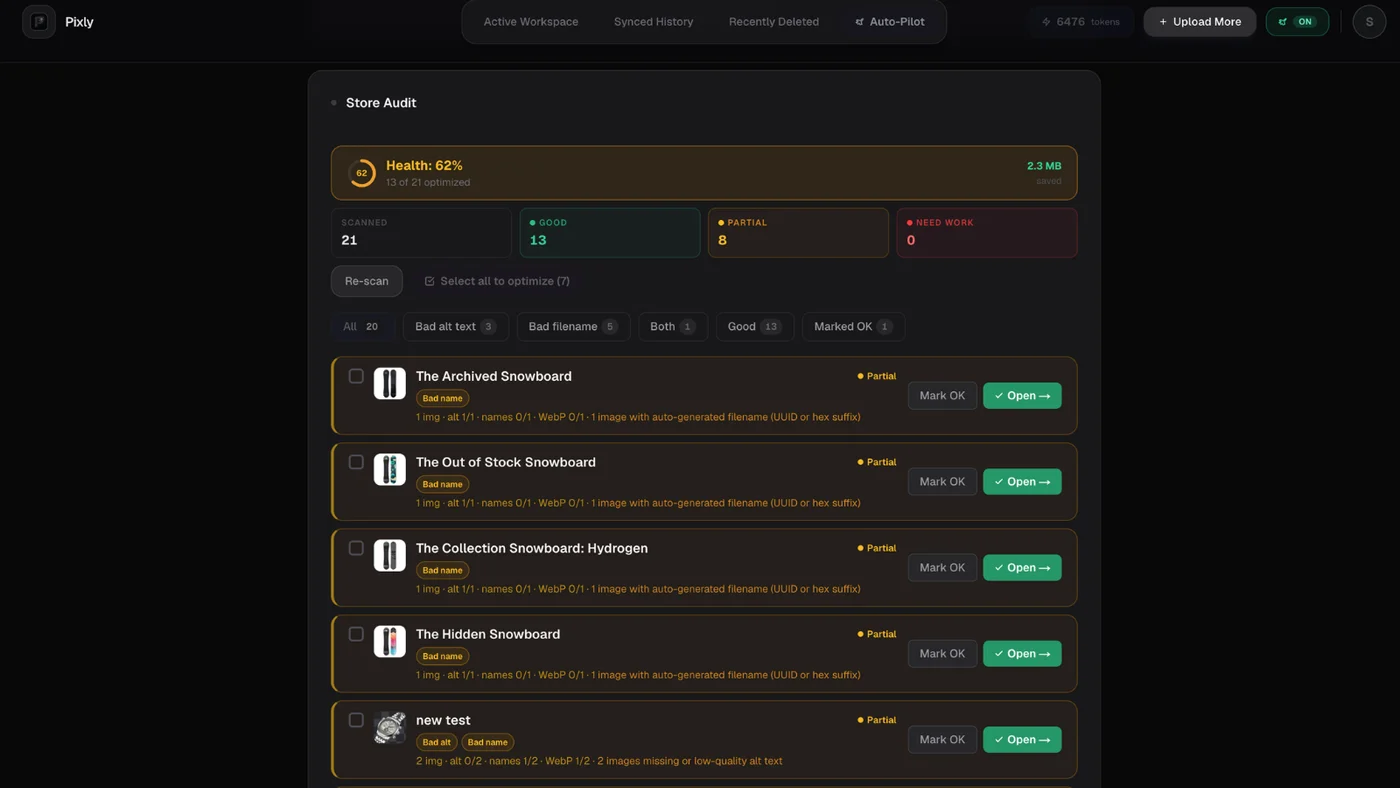
Pilot 10 products, preview the storefront, then expand.
Done when: Store Audit (or your spreadsheet) shows no missing alt text on best sellers and hero collections.
Week 4: Speed, apps, and one content piece
Goal: Remove non-content bottlenecks and publish one helpful page.
- Remove unused Shopify apps (script weight).
- Compress homepage banner assets in the theme editor.
- Publish one blog post or FAQ that answers a real buyer question. Link to a collection.
- Re-run PageSpeed on the same URLs from Week 1.
Speed playbook: how to optimize Shopify store speed.
Done when: Mobile PageSpeed on your best seller is flat or improved and one new content URL is live.
Repeat monthly
- Check Search Console Performance for page-2 queries worth optimizing.
- Add alt text to new products before launch.
- Refresh seasonal collection meta descriptions.
- Revisit tools once a year: best Shopify image optimization tools 2026.
Got questions?
Frequently asked
Yes. This is a schedule. The store SEO hub is the full checklist and reference.
Alt text and filenames on best-selling product images. Often faster than rewriting every collection page.
Yes. Week 3 works manually if the catalog is small. Apps help when SKU count grows.
Alt text and file size affect Google Image Search and Core Web Vitals. Hub: store SEO guide.
Run the cycle again on the next collection tier, or dive into how to add your store to Google for Merchant Center / Shopping if that is your channel.
Bottom line
How to optimize SEO on Shopify: four weeks, four focuses (index, top products, catalog images, speed + content). Use the store SEO hub when you need the full picture.
Install Pixly on Shopify · Features · Blog
Bereit für bessere Produktfotos?
Mach das 1-Minuten-Quiz für eine Tarifempfehlung oder starte direkt kostenlos. Kostenlos starten mit 69 Tokens. Keine Karte nötig.
Keine Kreditkarte nötig · Jederzeit kündbar
Mehr von Pixly
- So funktioniert Pixly – Upload, KI-Analyse, Prüfung, Shopify-Sync
- Funktionen — Store Audit, Auto-Pilot, WebP, Alt-Texte
- Preise – starte kostenlos mit 69 Tokens pro Monat
- Shopify-Shop für SEO optimieren (Guide 2026)
- Shopify-Shop bei Google anmelden: so geht's (Guide 2026)
- Pixly in Shopify nutzen: so funktioniert's (Guide 2026)