2026년 6월 4일 · 3분 읽기
Shopify SEO 최적화 방법 (4주 플랜)
4주 만에 끝내는 Shopify SEO 최적화 플랜이에요. 색인 등록, 상품 페이지, 카탈로그 이미지부터 속도와 콘텐츠까지 단계별로 정리했고, 스토어 SEO 전체 체크리스트로도 연결해 드려요.
How to optimize SEO on Shopify works best as a repeating cycle, not a one-afternoon task. This post is a 4-week action plan only.
For the full reference (checklists, image SEO depth, on-page basics), read the hub: how to optimize a Shopify store for SEO.
Before you start
Pick one primary metric: organic sessions, Image Search clicks, or revenue from organic. Run a baseline in Google Search Console if you have not already.
Week 1: Get indexed and measure
Goal: Google can crawl your store and you have a speed baseline.
- Verify your domain in Search Console and submit
sitemap.xml. - URL-inspect your homepage and top product. Request indexing if needed.
- Run PageSpeed Insights (mobile) on homepage, best collection, best seller.
Step-by-step indexing: how to add your Shopify store to Google.
Done when: Search Console shows pages indexed and you saved PageSpeed scores.
Week 2: Fix your top 20 products
Goal: Highest-revenue URLs have clean on-page SEO.
For your top 20 products by sales:
- Unique title and meta description (Search engine listing).
- Alt text on every gallery image in Products → Media.
- Descriptive filenames on re-upload (not
IMG_xxxx.jpg). - Readable URL handle (
/products/blue-linen-shirt).
Do not boil the ocean. Twenty strong product pages beat two hundred thin ones.
Image size targets if you re-upload: Shopify image size guidelines.
Done when: All top 20 products pass a manual spot check in admin.
Week 3: Scale catalog image SEO
Goal: Fix alt text and file format beyond your top sellers.
Manual edits fade after ~50 SKUs. Options:
- DIY: Block time, same steps as Week 2, batch by collection.
- Pixly: Store Audit (Starter and above) → queue flagged products → Review → sync. Tutorial: how to use Pixly.
After a scan, flagged products appear in the Store Audit list on the Auto-Pilot page:
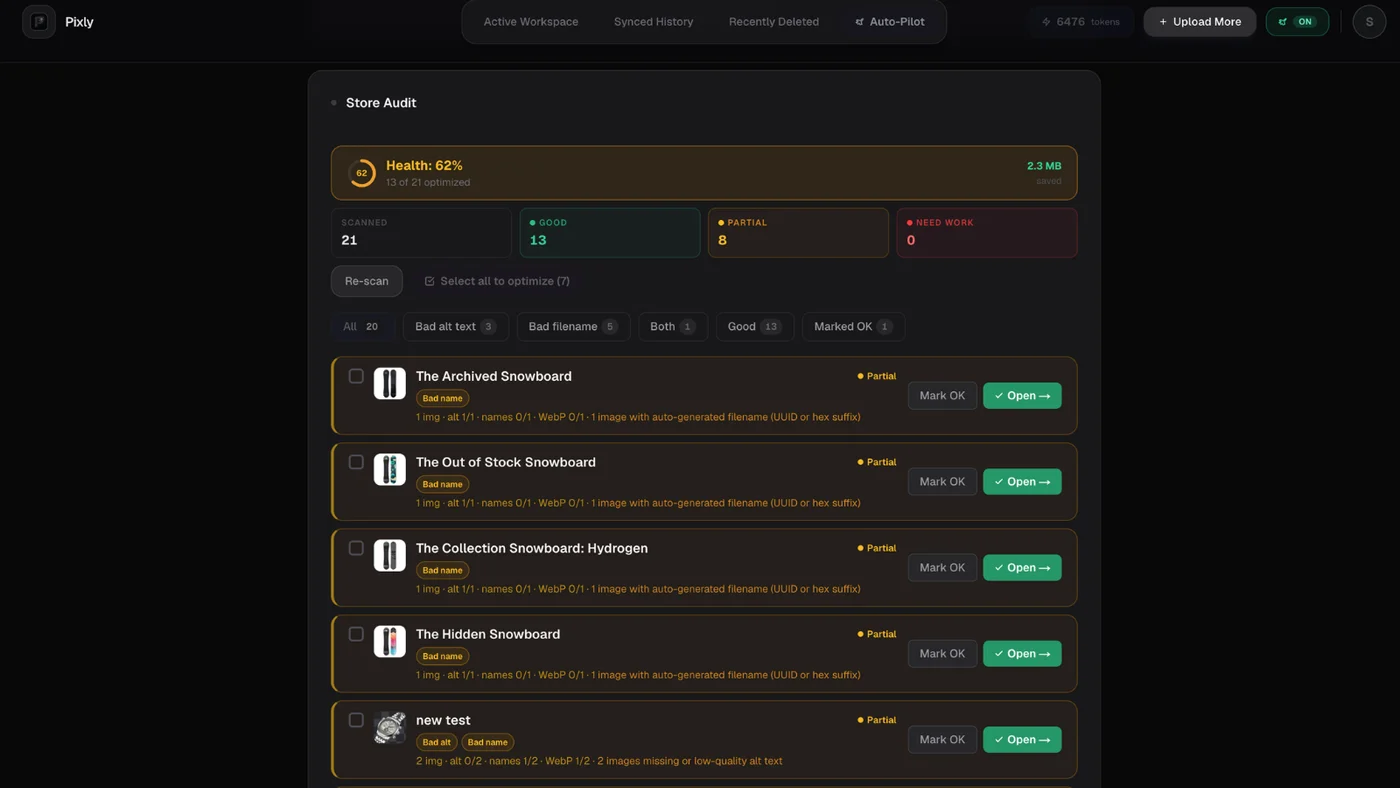
Pilot 10 products, preview the storefront, then expand.
Done when: Store Audit (or your spreadsheet) shows no missing alt text on best sellers and hero collections.
Week 4: Speed, apps, and one content piece
Goal: Remove non-content bottlenecks and publish one helpful page.
- Remove unused Shopify apps (script weight).
- Compress homepage banner assets in the theme editor.
- Publish one blog post or FAQ that answers a real buyer question. Link to a collection.
- Re-run PageSpeed on the same URLs from Week 1.
Speed playbook: how to optimize Shopify store speed.
Done when: Mobile PageSpeed on your best seller is flat or improved and one new content URL is live.
Repeat monthly
- Check Search Console Performance for page-2 queries worth optimizing.
- Add alt text to new products before launch.
- Refresh seasonal collection meta descriptions.
- Revisit tools once a year: best Shopify image optimization tools 2026.
Got questions?
Frequently asked
Yes. This is a schedule. The store SEO hub is the full checklist and reference.
Alt text and filenames on best-selling product images. Often faster than rewriting every collection page.
Yes. Week 3 works manually if the catalog is small. Apps help when SKU count grows.
Alt text and file size affect Google Image Search and Core Web Vitals. Hub: store SEO guide.
Run the cycle again on the next collection tier, or dive into how to add your store to Google for Merchant Center / Shopping if that is your channel.
Bottom line
How to optimize SEO on Shopify: four weeks, four focuses (index, top products, catalog images, speed + content). Use the store SEO hub when you need the full picture.
Install Pixly on Shopify · Features · Blog
상품 사진, 깔끔하게 다듬어 볼까요?
1분 퀴즈로 맞는 플랜을 추천받거나 바로 무료로 시작하세요. 69 토큰으로 무료 시작이에요. 카드는 필요 없어요.
카드 등록 불필요 · 언제든 해지 가능
Pixly 더 알아보기
- Pixly 사용 방법 — 업로드, AI 분석, 검토, Shopify 동기화
- 기능 — Store Audit, Auto-Pilot, WebP, 대체 텍스트
- 요금제 — 매달 69 토큰으로 무료 시작
- Shopify 스토어 SEO 최적화 방법 (2026 가이드)
- Shopify 스토어를 구글에 등록하는 방법 (2026 가이드)
- Shopify에서 Pixly 사용하는 방법 (2026 가이드)