26 mei 2026 · 3 min leestijd
Shopify productafbeeldingen automatisch optimaliseren (gids 2026)
Optimaliseer nieuwe Shopify-productafbeeldingen automatisch met Auto-Pilot: Semi-Auto vs. Full Auto, dagelijkse limieten, webhooks en controleren vóór synchroniseren.
Every new SKU you add is another chance to ship heavy JPEGs and blank alt text. Shopify auto optimize new product images sounds like a dream until an app overwrites your catalog without asking. Pixly Auto-Pilot watches new products and queues optimization, with modes that keep you in control.
This guide explains Semi-Auto vs Full Auto, plan limits, and how Auto-Pilot fits the review-first pipeline.
What Auto-Pilot does
When enabled on a connected store, Auto-Pilot:
- Detects new or updated products via Shopify webhooks
- Queues product media for the Pixly pipeline (alt text, WebP, square crop, filenames)
- Runs analysis based on your mode (Semi-Auto or Full Auto)
- Syncs only according to your approval rules
Auto-Pilot focuses on product media, not theme banners or collection hero art.
Semi-Auto vs Full Auto
| Mode | Behavior | Best for |
|---|---|---|
| Semi-Auto | Processes new products; you review and approve before sync | Most merchants starting out |
| Full Auto | Processes and syncs without per-image review (Scale plan) | High-volume stores with trusted presets |
Default Pixly workflow keeps review before sync unless you explicitly enable full automation on eligible plans.
Enable Auto-Pilot in Pixly
Open Auto-Pilot from the Pixly nav on a connected store:
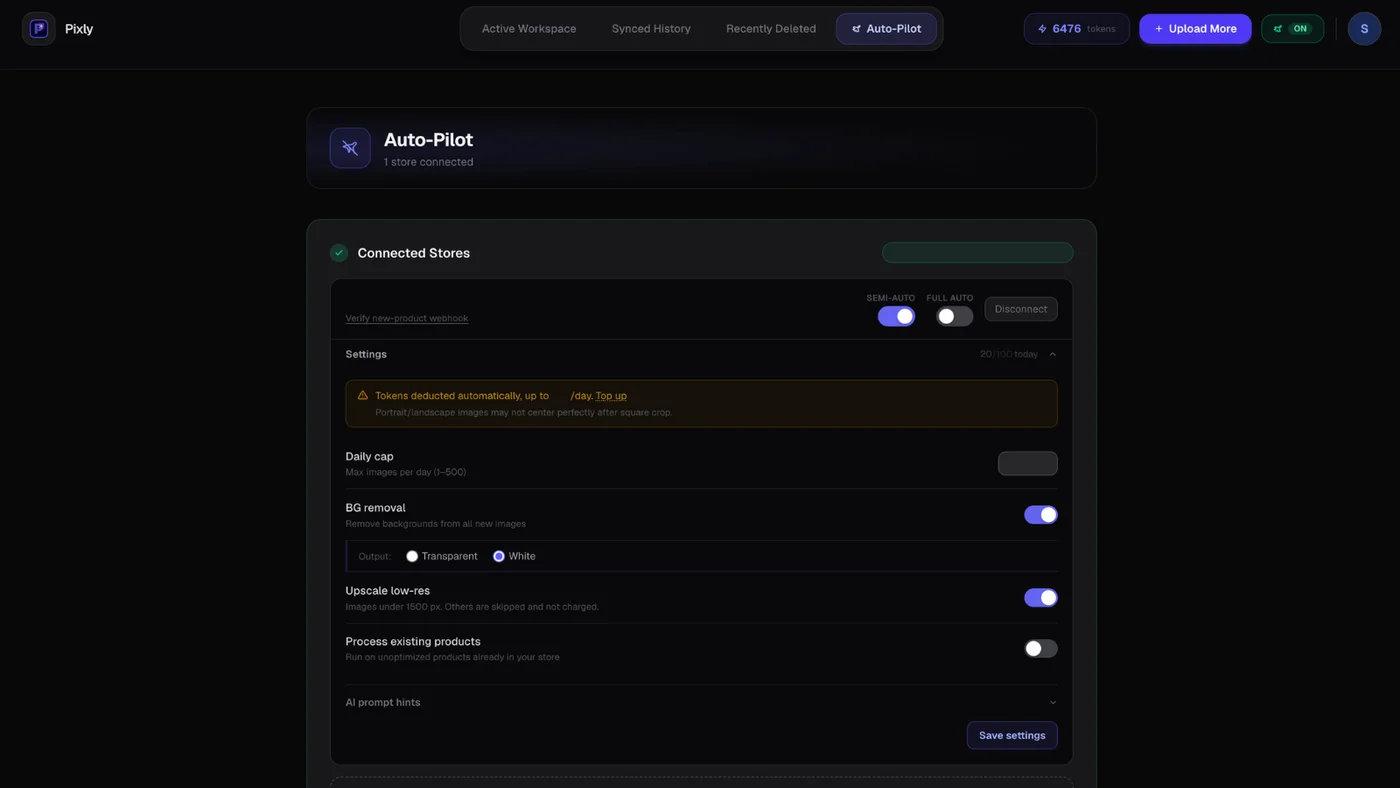
- Choose Semi-Auto or Full Auto (plan-dependent).
- Confirm the store webhook is connected (Pixly handles this on install).
- Add a new test product in Shopify with at least one image.
- Watch the job appear in Pixly workspace or suggested queue.
- Review output before sync on Semi-Auto.
Daily limits by plan
Auto-Pilot requires a Growth or Scale plan. It respects token budgets and daily caps on your tier. See Pixly pricing for current limits.
If you hit the cap, new products queue for the next window rather than failing silently.
Auto-Pilot vs manual upload
| Workflow | Trigger | Control |
|---|---|---|
| Manual upload | You drag files or import catalog | Full per-batch review |
| Store Audit | You scan existing catalog gaps (Starter and above) | Prioritized backlog |
| Auto-Pilot | New product in Shopify | Ongoing, mode-dependent review |
Use Auto-Pilot so new products never ship unoptimized. Run Store Audit once (Starter and above) to fix historical gaps.
What Auto-Pilot optimizes
On each approved image (defaults):
- WebP conversion (on by default)
- 1:1 center crop at 2000 × 2000 px (2048 when upscale approved)
- AI alt text from visual analysis
- SEO filename proposal
- Optional AI upscale when low-res alert triggers (your approval, +4 tokens)
Nothing replaces your originals in Shopify until sync completes.
Setup checklist
- Connect Shopify store via OAuth (no password stored)
- Enable Auto-Pilot mode on Growth+ plan if required
- Run a test product with Semi-Auto first
- Confirm sync in Sync history

Got questions?
Frequently asked
Shopify CDN optimizes delivery but does not write alt text, rename files, or batch-convert your catalog. Auto-Pilot apps like Pixly handle product media optimization on new SKUs.
New products are processed automatically, but you approve images before they sync to Shopify.
On eligible plans, Full Auto can sync without per-image approval. Enable only when you trust your presets.
Auto-Pilot targets new and updated products. Use Store Audit or manual import for existing catalog gaps.
Pixly works on copies; you approve before sync on Semi-Auto. Soft-deleted images can be recovered within 14 days.
Bottom line
Shopify auto optimize new product images should not mean blind overwrite. Auto-Pilot queues new SKUs through the same pipeline as manual uploads, with Semi-Auto keeping review in the loop.
Install Pixly on Shopify and enable Auto-Pilot on your test store first.
Klaar om je productfoto's op te poetsen?
Doe de quiz van 1 minuut voor een abonnementsadvies, of begin gewoon gratis. Begin gratis met 69 tokens. Geen creditcard nodig.
Geen creditcard nodig · Altijd opzegbaar
Meer van Pixly
- Zo werkt Pixly — uploaden, AI-analyse, controleren, synchroniseren met Shopify
- Functies — Store Audit, Auto-Pilot, WebP, alt-tekst
- Prijzen — begin gratis met 69 tokens per maand
- Shopify Store Audit voor afbeeldings-SEO (gids 2026)
- Pixly gebruiken op Shopify (gids 2026)
- Foto's in bulk uploaden naar Shopify (gids 2026)
- Afbeeldingen wijzigen op je Shopify-website (gids 2026)