26 de mayo de 2026 · 3 min de lectura
SEO del nombre de archivo de las imágenes en Shopify (Guía 2026)
SEO del nombre de archivo de las imágenes en Shopify: cambia IMG_4523.jpg por nombres con palabras clave, estructura de URL y renombrado en bloque para catálogos de producto.
Every product photo on Shopify gets a CDN URL. When the path ends in IMG_4523.jpg, you waste a ranking signal Google Image Search actually reads. Shopify image file name SEO means descriptive, hyphenated slugs that match what is in the photo.
This guide covers manual renames, bulk limits, and AI-assisted renaming at catalog scale. Pair with Shopify alt text SEO for full image metadata.
Why filenames matter for Shopify SEO
| Signal | What search engines use it for |
|---|---|
| Filename | URL token in image CDN path; image search relevance |
| Alt text | Primary image description |
| Surrounding copy | Product page context |
Filenames are not a magic ranking hack. They are one more field where blue-linen-shirt-front.webp beats DSC00412.jpg.
Shopify image URL structure
Uploaded product media URLs typically look like:
cdn.shopify.com/s/files/1/xxxx/files/navy-linen-shirt-front.webp
The filename segment persists on the CDN. Renaming requires re-uploading or replacing the file in most cases, not editing the URL string alone.
Manual: rename before upload
- On your computer, rename files with lowercase hyphens:
product-color-angle.webp - Products → Media → upload renamed file (or replace existing).
- Add alt text → Save.
Shopify does not offer bulk filename edit in admin for existing media.
Filename SEO best practices
| Do | Avoid |
|---|---|
womens-leather-crossbody-bag-black.webp | IMG_2847.jpg |
| Lowercase, hyphens between words | Spaces, underscores, special chars |
| Color + product type + angle when useful | Keyword stuffing |
| Match variant when files differ | Same filename on every colorway |
Keep slugs readable. One primary descriptor beats ten keywords.
Bulk rename product image filenames
Spreadsheet imports rarely handle visual context. Pixly proposes SEO filenames from product and image context during review:
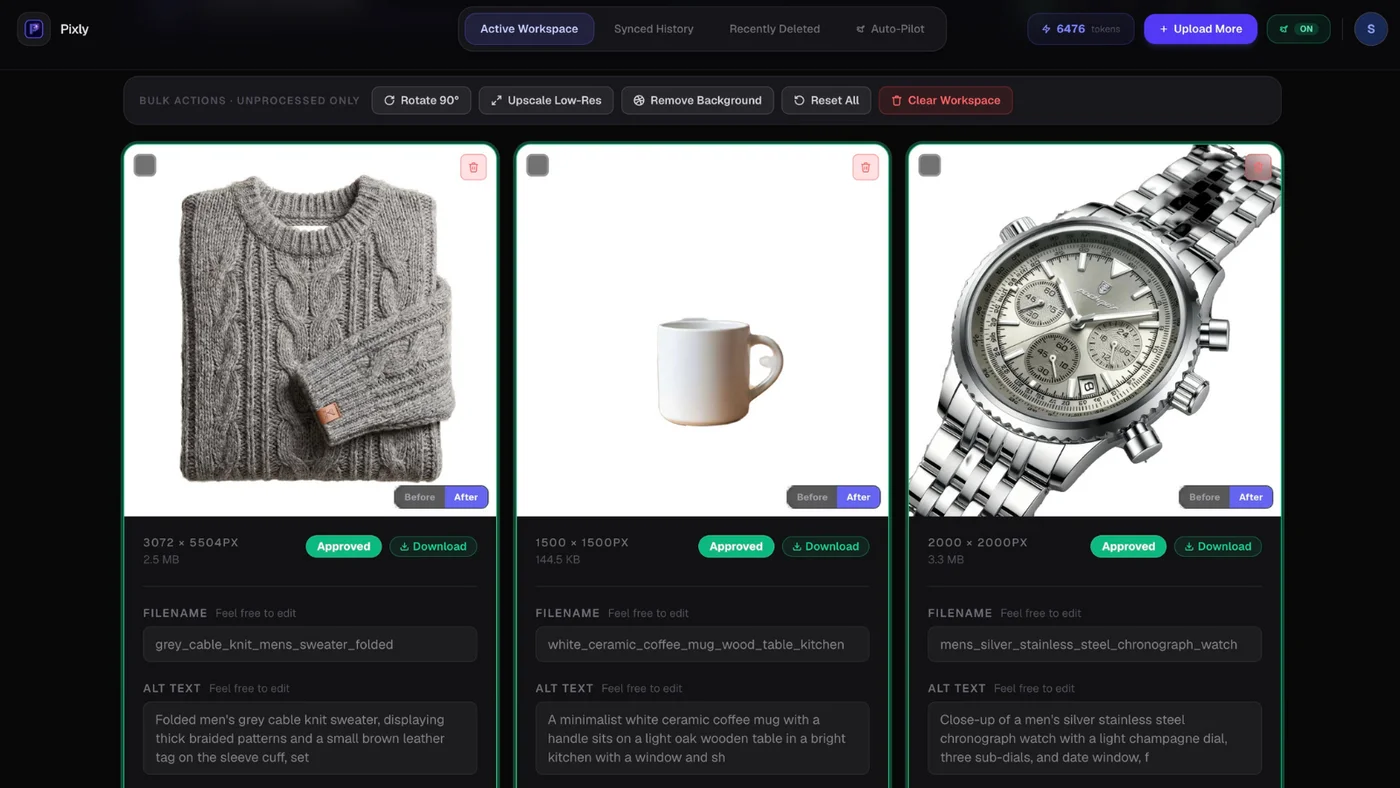
Approve per image or bulk approve when the batch is consistent, then sync so Shopify CDN paths update with the new files.
Filename + alt text together
| Field | Example |
|---|---|
| Filename | ceramic-pour-over-coffee-dripper-white.webp |
| Alt text | White ceramic pour-over coffee dripper with ribbed texture, top view |
Aligned metadata helps Google Image Search and AI shopping summaries. See Google indexing guide.
Got questions?
Frequently asked
Yes. Filenames appear in image URLs and provide a relevance signal for image search alongside alt text.
Rename locally before upload, or replace media with a new file. Bulk rename at scale uses app sync workflows like Pixly.
They should describe the image content. Matching handle can help organization but is not required.
Not in native admin. Use export/replace workflows or Pixly to rename during optimized sync.
WebP or JPEG with descriptive hyphenated slugs. WebP also helps page speed.
Bottom line
Shopify image file name SEO is rename-before-upload discipline at small scale, and review-first bulk rename at catalog scale. Fix filenames when you optimize, not as a separate six-month project.
Install Pixly on Shopify to rename and sync SEO filenames with alt text and WebP.
¿Listo para mejorar tus fotos de producto?
Haz el test de 1 minuto y te recomendamos un plan, o empieza gratis. Empieza gratis con 69 tokens. Sin tarjeta.
Sin tarjeta de crédito · Cancela cuando quieras
Más de Pixly
- Cómo funciona Pixly — sube, analiza con IA, revisa y sincroniza con Shopify
- Funciones — Store Audit, Auto-Pilot, WebP, texto alternativo
- Precios — empieza gratis con 69 tokens al mes
- SEO del texto alternativo en Shopify (Guía 2026)
- Cómo añadir tu tienda Shopify a Google (guía 2026)
- Tamaño de las imágenes en Shopify: guía (2026)