2 giugno 2026 · 4 min di lettura
Come ottimizzare il tuo negozio Shopify per la SEO (Guida 2026)
Come ottimizzare il tuo negozio Shopify per la SEO nel 2026: foto prodotto, testo alternativo, velocità del sito, Search Console e una checklist facile da seguire.
How to optimize a Shopify store for SEO in 2026 is not one task. It is product pages, site speed, structured data, and the image layer that Google Image Search actually reads.
This guide is the hub: a full checklist and reference. Want a week-by-week schedule instead? Read the spoke: how to optimize SEO on Shopify (4-week plan).
For indexing setup, see how to add your Shopify store to Google.
Shopify SEO checklist (priority order)
| Area | What to fix | Impact |
|---|---|---|
| Product image alt text | Unique description per image | Google Image Search, accessibility |
| Image filenames | Descriptive names before upload | Image SEO, organization |
| Page speed / WebP | Compress product photos | Core Web Vitals, mobile conversion |
| Titles and meta descriptions | Keyword-rich, unique per product | Organic click-through |
| Search Console | Verify, submit sitemap | Indexing visibility |
| Internal linking | Collections, related products | Crawl depth |
| Blog and content | Guides, FAQs | Long-tail keywords |
Images are often the fastest overlooked layer. You can have perfect titles and still lose Image Search with blank alt text on 400 SKUs.
Product image SEO (manual)
For each product in Products → Media:
- Add alt text that describes the product (color, material, angle).
- Rename files before upload (e.g.
womens-blue-running-shoe-side.webp). - Resize to 2000 × 2000 px square and compress.
- Prefer WebP for smaller files.
At scale, this breaks down. See bulk workflow below.
Product image SEO (catalog scale)
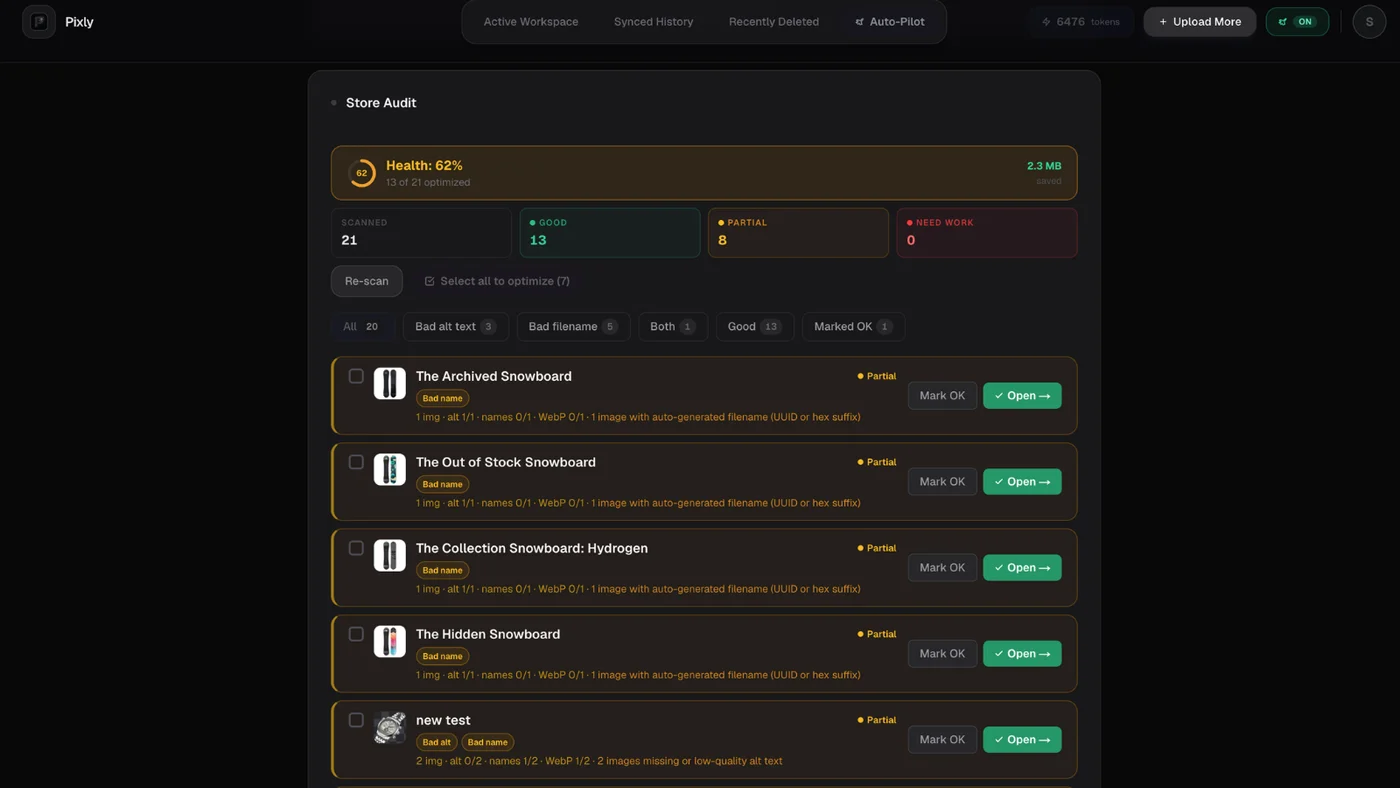
On Starter and above, Store Audit scans your Shopify catalog for image gaps: missing alt text, non-WebP files, and products that need work:
In Review, Pixly proposes alt text and SEO filenames from what is in the photo, plus WebP and 1:1 crop before sync:
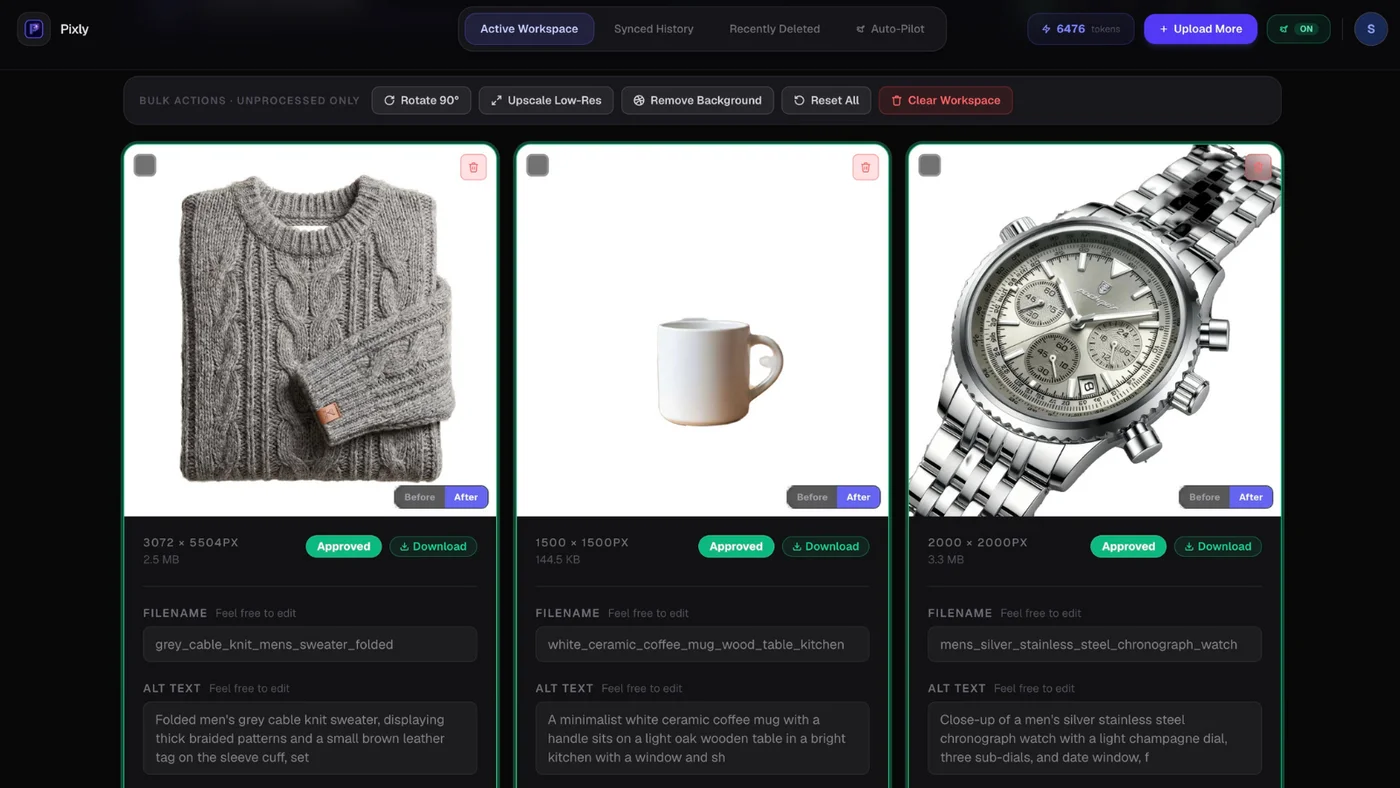
Nothing syncs until you approve. Read how to use Pixly for the full workflow.
Image SEO Shopify (dedicated checklist)
Image SEO shopify work sits at the intersection of Google Image Search, page speed, and accessibility. Use this checklist on top of titles and meta descriptions:
| Task | Resource |
|---|---|
| Unique alt text on every product image | Shopify alt text SEO hub |
| Bulk alt gaps at 50+ SKUs | How to bulk edit alt text |
| SEO filenames instead of IMG_4523.jpg | Shopify image file name SEO |
| WebP and lighter file weight | Convert all images to WebP |
| AI search metadata for ChatGPT Shopping | Product images for AI search |
| Dimensions and square crop | Shopify image size guidelines |
Image SEO is not a one-time theme setting. It is per-image metadata on every SKU you want to rank.
Site speed and SEO
Google uses Core Web Vitals as a ranking signal. Product images often drive LCP on product and collection templates.
Fixes:
- Compress and resize catalog photos
- Convert to WebP
- Remove unused apps that inject scripts
Full speed guide: how to optimize Shopify store speed.
On-page SEO basics (non-image)
- Product titles: Clear, keyword-natural (avoid stuffing).
- Meta descriptions: Unique per product in Search engine listing preview.
- URLs/handles: Short, readable (
/products/blue-linen-shirt). - Collection descriptions: Unique copy, not duplicate manufacturer text.
- Structured data: Shopify outputs product schema on most themes. Validate with Google Rich Results Test.
Content and internal links
- Publish buying guides and FAQs on your Shopify blog.
- Link from blog posts to relevant collections and products.
- Use descriptive anchor text (not "click here").
Pixly's own blog covers image size, speed, and Google indexing for merchants.
Got questions?
Frequently asked
Optimizing alt text, filenames, format (WebP), dimensions, and file size on product media so Google Image Search and AI tools can understand your catalog. Start with the alt text SEO hub.
Start with Search Console verification, unique product titles and meta descriptions, then fix product image alt text, filenames, and file size across the catalog.
Shopify provides clean URLs, sitemaps, and SSL. You still need strong product content, fast pages, and optimized images. The platform does not write alt text for you.
Very. They affect Google Image Search, page speed, and shopper trust. Catalogs with generic filenames and empty alt text leave traffic on the table.
For AI alt text, WebP conversion, square crop, and sync back to Shopify, Pixly is built for that pipeline. Compare options in best Shopify image optimization tools.
Edit alt text and filenames manually, compress images before upload, verify in Search Console, and improve collection copy. Apps help when the catalog exceeds manual capacity.
Bottom line
How to optimize a Shopify store for SEO combines indexing setup, on-page copy, speed, and catalog image quality. Fix images at scale when manual edits stop being realistic.
Install Pixly on Shopify · Features · Pricing · FAQ
Pronto a dare un tocco professionale alle tue foto prodotto?
Fai il quiz di 1 minuto per scoprire il piano consigliato, oppure inizia subito gratis. Inizia gratis con 69 token. Nessuna carta richiesta.
Nessuna carta di credito richiesta · Disdici quando vuoi
Scopri di più su Pixly
- Come funziona Pixly — carichi, l'AI analizza, controlli, sincronizzi con Shopify
- Funzionalità — Store Audit, Auto-Pilot, WebP, testo alternativo
- Prezzi — parti gratis con 69 token al mese
- Come aggiungere il tuo negozio Shopify a Google (Guida 2026)
- Come ottimizzare la SEO su Shopify (piano in 4 settimane)
- Testo alternativo e SEO su Shopify (Guida 2026)
- Convertire tutte le immagini Shopify in WebP (Guida 2026)
- Dimensioni delle immagini Shopify: linee guida (Guida 2026)